
Not a developer? Not a problem.
Three Claude Code projects you can build this week — no coding experience required.



I'm not an engineer.I built all three myself — from my terminal window.
The deal.
What Claude Code is
In plain English — and why it's different from the chat window you already know.
Three real builds
The actual prompts and the step-by-step of how each one came together.
Three ideas for your week
Projects you can realistically start Monday. No coding experience required.
Prototypes, not products. That's the whole point.
What is Claude Code?
An AI agent that lives in your terminal. You describe what you want in plain English — it does the work, and shows you every step.
Not a chat window that hands you code to paste. It writes the files, runs them, reads the errors, and fixes them — while you steer.
The mental-model shift.
“I need to stitch together a solution using a no-code tool.”
“I'll build a prototype with code this afternoon.”
Code stopped being the barrier. Now the only question is knowing what you want — the thing RevOps is already great at.
Problem → idea → solution.
Not a must-have toolkit — just three examples of how you can go from a nagging problem to a working solution quickly, all on your own.
Live HubSpot pipeline dashboard
QTD pacing, rep performance, and deal-stage breakdowns — no BI tool.
AI deal-review bot
Grades every open deal red / yellow / green like a CRO, posts to Slack.
Automated content pipeline
One transcript → blog, social, YouTube copy, and a CMS draft in minutes.
Learn the pattern, not just the tools.
Every project in this talk follows the same six beats. Steal the sequence.
The manual grind you're tired of doing.
The first plain-English ask you type.
The steps, in order, including the false starts.
The real plumbing — APIs, model, schedule.
Actual dollars to run it. Usually shockingly little.
The honest limits. When not to reach for this.
First, get it on your machine.
When I first did this I asked Claude in the chat window “how do I install this?” Here's the clean version, no guessing.
curl -fsSL https://claude.ai/install.sh | bashOne line in your terminal. Downloads Claude Code and keeps it updated for you.
claudeRun this inside any project folder to open a session.
A browser tab opens — sign in with your Claude account (Pro, Max, or Team).
An interactive Claude session, right in your terminal. Start describing what you want.
Prefer Homebrew? brew install --cask claude-code
Wait — why do I need GitHub?
Two words you'll hear constantly — in plain English, no CS degree required.
A “repo”
Short for repository — a project folder that remembers every change you make. Like Google Docs version history, but for all your files.
GitHub
The cloud home for your repo. Free backup, plus a place your whole team can see exactly who changed what, and when.
Why it matters here
As Claude Code builds, every change is saved. You can see what changed, undo a mistake instantly, and deploy with confidence.
Version control is your undo button— you're never one bad change away from disaster.

A live HubSpot pipeline dashboard.
You want QTD pacing, rep performance, and deal-stage breakdowns the way HubSpot won't show them. The alternatives: fight native reporting, or buy a BI tool and hire someone to model the data. So I built exactly the views I wanted instead.
Five views. One glance.
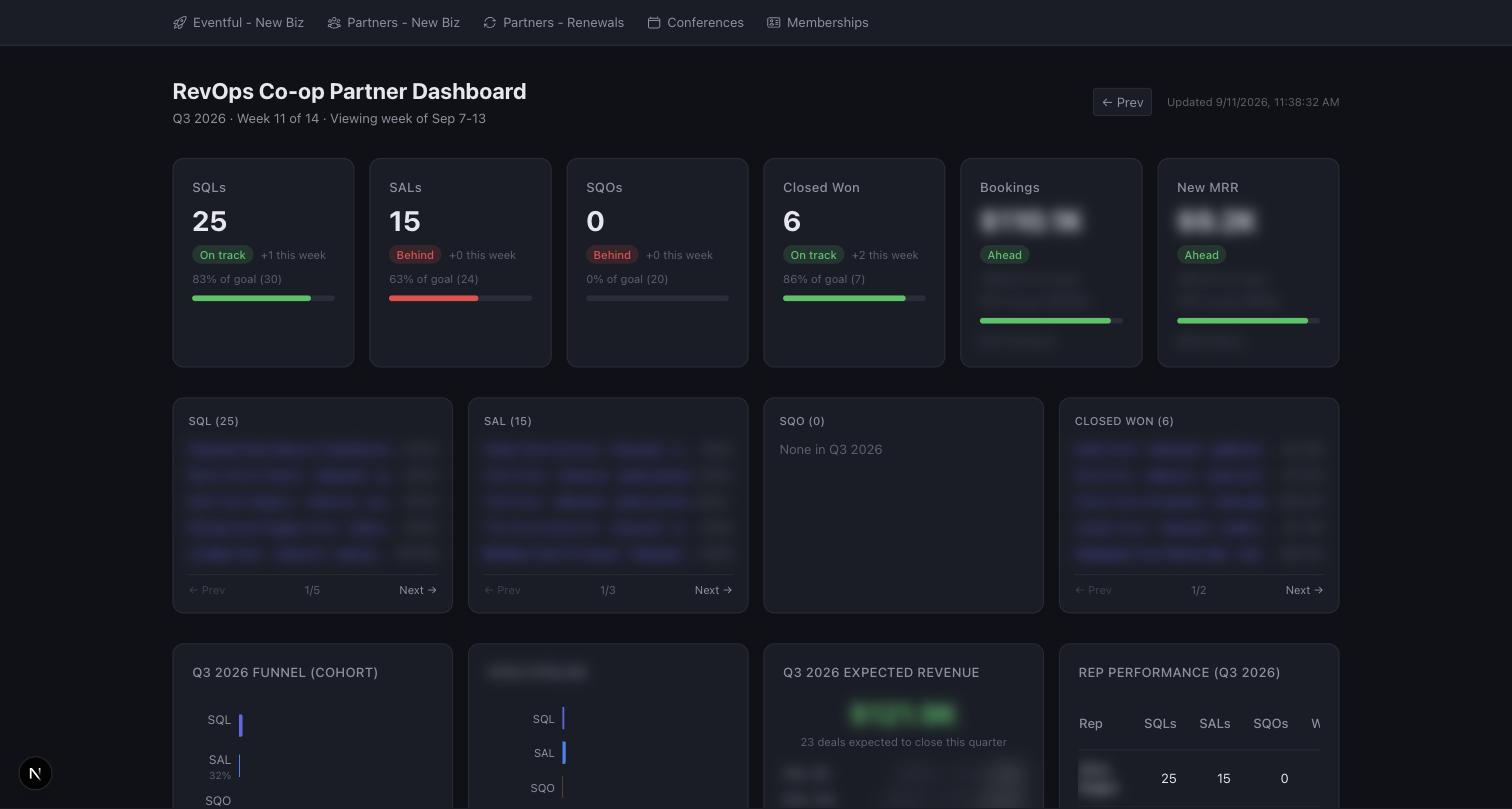
The first thing I typed.
I want to see how our sales pipeline is doing at a glance —
how much we've booked this quarter versus our goal, how each rep is
tracking, and how many deals are sitting in each stage. Pull it from
HubSpot and put it on a simple web page I can check any time. I don't
want to pay for a BI tool.
One view at a time.
No AI at runtime. Just math.
Claude Code wrote it. But the dashboard itself is a plain web app doing arithmetic on live data — no model in the loop, so it's fast, dependable, and nearly free.
does the math
Where it breaks. Say it out loud.
- ▸No login. Anyone with the URL sees live revenue — fine for a private link, not for the org.
- ▸Pipeline names, stage IDs, and targets are hardcoded. A CRM restructure means a code change.
- ▸It reads live APIs on each load — no warehouse, so it shows current state, not history.
- ▸The forecast uses static win rates, not a learned model. Treat it as a directional read.
You need governed access, shared metric definitions across a big team, or auditable point-in-time history. That's what a real BI tool is for.
An AI deal-review bot.
Before every forecast call, someone opens 30+ deals one by one to sanity-check them. This bot reads each open deal's activity, contacts, and next steps, grades it red / yellow / green like a CRO would, and posts the audit to Slack every Friday.
The Friday health audit.
Illustrative — deal names and reasons are fictional.
The “CRO” is a prompt.
There's no scoring formula. The color is the model's judgment against this rubric — this exact text runs in production.
You are a Chief Revenue Officer reviewing open sales deals.
Analyze each deal and classify it as red, yellow, or green based on
these criteria. Use all available information to infer deal health —
do not flag things as unknown, make a judgment call.

1. Activity pattern — Are there recent emails, calls, or meetings
   showing active engagement? ... Sales cycles are typically 30-60
   days so use that as context, not a hard cutoff.
2. Contacts — Is at least one contact associated with the deal? No
   contacts is always a red flag.
3. Next steps — Is the Next Step field filled in with something
   specific and actionable? A blank or vague next step is a concern.
4. Next meeting — Is there a meeting scheduled or referenced?
5. Deal momentum — Considering the stage, close date, deal age, and
   activity pattern together, does this deal appear to be moving
   forward?

Green  = active engagement, contacts present, next steps defined,
         deal progressing.
Yellow = one or two gaps but deal is not stalled.
Red    = multiple gaps — no contacts, no next steps, no recent
         activity, or deal clearly stalled.

Respond with JSON only:
{"status": "red|yellow|green", "reason": "two to three concise
sentences explaining the classification"}The first thing I typed.
Every Friday before our forecast call, I go through every open
deal to figure out which ones are healthy and which are stalling. I
want something that does that first pass for me — look at each open
deal in HubSpot and tell me if it's on track, at risk, or in trouble,
with a quick reason. Then drop it in Slack and tag whoever owns the
deal.
Built with Claude Code. Runs on GPT-4o.
Claude Code built it. The part that reads each deal and makes the call happens to run on GPT-4o — but that's just a setting. Want it on Claude instead? One line.

One gotcha: the first version quietly missed meetings booked through the calendar, so healthy deals looked dead. The demo can look great while the data underneath is wrong.
Where it breaks. Say it out loud.
- ▸The color is an opinion, not a verdict. The same deal can drift week to week — it triages, it doesn't decide.
- ▸One model call per deal, in a loop. Fine for 30 deals; slow and pricey at thousands.
- ▸Garbage in, confident garbage out. If CRM hygiene is poor, the model rationalizes it.
- ▸It flags; a human still has to act on the red list.
You need auditable, reproducible numbers — forecast commit, comp, board metrics. Use deterministic rules, not an LLM's judgment.
An automated content pipeline.
Every podcast and webinar is a goldmine that used to take hours to repurpose. Drop a transcript in Notion and this turns it into a blog post, social copy, a YouTube description, and a CMS draft — in your brand voice, in minutes. A human reviews and publishes.
Build the brain first. Then it runs itself.
The hard part isn't the transcript — it's the voice. So we built that first, from everything we'd already published.
One human reviews the draft and hits publish.
The brand voice lives in a folder.
A version-controlled “brain” of markdown rules gets loaded into every run. Edit the rules, not the code. These are real, verbatim.
A weekly crawler keeps the brain fresh by re-reading everything the brand has published.
The prompt that keeps it honest.
You are a content writer for RevOps Co-op, producing
written outputs from event transcripts.
You must follow the style guide, editorial rules, and publishing
spec exactly.
Factual accuracy is non-negotiable — never fabricate quotes,
statistics, timestamps, or attributions.
Every direct quote must use the speaker's actual words from the
transcript.
- ▸Do NOT invent partner URLs. Use ONLY links from the VERIFIED PARTNER CONTENT section.
- ▸COMPETITOR CONFLICT: when the guest has a partner, don't link to content featuring a competing company.
- ▸Every internal backlink must go to a SPECIFIC article — never a generic /blog category page.
- ▸Never use em dashes. Weave partner links naturally through the body, not just the closing CTA.
Roughly half the build was prompt-tuning like this — each rule is scar tissue from a way the model once misbehaved.
The first thing I typed.
I have podcast and webinar transcripts in Notion. Build a
script that reads a transcript and uses Claude to write a blog post,
a LinkedIn post, a Slack post, and a YouTube description — all in our
brand voice. Keep the brand voice in a folder of markdown files so I
can edit the rules without touching code. Write the results back into
the Notion page and create a draft in our Webflow CMS. A human
reviews and publishes.
A button in Notion kicks it all off.

Where it breaks. Say it out loud.
- ▸It's a repurposer, not an author. It voices what's in the transcript; it can't add net-new insight.
- ▸Everything ships as a draft. A human reviews before anything goes live — by design.
- ▸The guardrails against fabricated quotes and stats are instructions, not verification. Fact-check.
- ▸Output is parsed by looking for markers in the text. If the model renames one, that asset silently drops.
You need original thought leadership, or any context where an unverified quote or stat can't be tolerated without a human fact-check first.
Same recipe, three times.
Connect the systems you already pay for. Describe the outcome in plain English. Let it run on a schedule. The backend used whatever fit — no LLM for the dashboard, GPT-4o for the deal bot, Claude for content.
Claude Code was the constant. The model is a choice you get to make.
The honest version.
These are prototypes that earn their keep — not production software. Know the difference.
None of these had real auth or secrets management out of the box. Don't expose customer data casually.
IDs, targets, and field names live in code. When the CRM changes, they break quietly.
The same input can give a different answer. Great for judgment, wrong for numbers of record.
No vendor is on the hook. When it breaks at 5pm Friday, you're the support team.
The trick is knowing when a $10/month prototype beats a $50K platform — and when it absolutely doesn't.
Three you can realistically build first.
Start with something read-only and low-stakes. Ship the smallest useful version, then grow it.
A single-number dashboard
Pull one metric you check constantly — QTD bookings, or open pipeline — and put it on a page. Add a second metric tomorrow.
A weekly digest bot
Have it summarize this week's closed-won, or new leads by source, and post it to Slack every Monday.
A repurpose-one-thing script
Turn your last webinar transcript into a LinkedIn post in your voice. One input, one output. Expand later.
The actual on-ramp.
Three takeaways.
Go build something this week.
Pick the smallest tool your ops team has been waiting for — and prototype it this afternoon.